Scams today are far more sophisticated than the obvious prize-notification emails of the past. They show up as text messages from your bank, phone calls from “tech support,” social media ads, and even convincing fake online stores. Learning to recognize scam warning signs is one of the most practical skills a consumer can develop, because scammers count on people reacting before they think. Whether you're checking email, answering an unknown phone number, or shopping online, the same patterns tend to repeat: urgency, secrecy, and requests for information or payment that a legitimate business would never ask for. This guide breaks down the most common warning signs so you can spot trouble before it costs you money or your personal information.
Why Scam Awareness Matters
Online fraud has grown steadily as more of daily life — banking, shopping, job searching — moves online. Financial losses from scams add up quickly, and many victims never recover the money once it's sent. Beyond the financial hit, identity theft can take months to untangle, affecting credit scores, loan applications, and even tax filings. There's also an emotional toll: embarrassment, stress, and a loss of trust that can make people hesitant to shop or communicate online at all. The good news is that most scams follow recognizable patterns. Learning to spot these patterns early — before money changes hands — is far more effective than trying to recover losses afterward. Awareness is, in many cases, the only real defense consumers have.
Common Scam Warning Signs Every Consumer Should Recognize
1. Pressure to Act Immediately
Scammers want you to act before you have time to think it through. Common phrases include “your account will be suspended,” “this offer expires in one hour,” or “immediate payment required to avoid legal action.” Legitimate companies typically give you time to respond, offer multiple ways to verify a request, and rarely threaten immediate consequences over a single missed message. If you feel rushed, that urgency is itself a warning sign worth pausing over.
2. Requests for Personal or Financial Information
Be cautious anytime a message or caller asks for sensitive details such as Social Security numbers, banking credentials, passwords, one-time verification codes, or full credit card numbers. Legitimate businesses already have most of this information on file and rarely need to confirm it through unsolicited emails, texts, or calls. One-time codes in particular should never be shared with anyone — they exist specifically to confirm that you, and only you, are accessing your account.
3. Payment Requests Through Unusual Methods
Gift cards, cryptocurrency, wire transfers, and peer-to-peer payment apps are favorite tools for scammers because these payments are difficult to trace or reverse once sent. No legitimate government agency, utility company, or business will ask you to pay a bill or fine using gift cards. If someone insists on an unconventional payment method and resists offering standard alternatives like a credit card or check, treat it as a serious red flag.
4. Deals That Look Too Good to Be True
Unrealistic discounts, surprise giveaways, prize notifications, and investment opportunities promising guaranteed high returns are classic scam tactics. These offers are designed to create excitement that overrides skepticism. Before responding, ask whether the deal makes sense: did you actually enter a contest? Does a stranger online really have an investment strategy that guarantees profit? If it sounds unrealistic, it almost certainly is.
5. Suspicious Emails, Text Messages, or Phone Calls
Phishing emails, smishing (SMS scams), and vishing (phone-based scams) often impersonate banks, delivery services, or government agencies. Common tactics include fake tracking links, alerts about unauthorized charges, or warnings about tax problems. Look closely at sender addresses and phone numbers — they often differ slightly from the real organization's official contacts. When in doubt, don't click links or call back numbers provided in the message; instead, go directly to the company's official website or app.
6. Fake Websites or Online Stores
Fake online stores often use misspelled domain names, lack verifiable contact information, and feature low-quality product photos or pricing that seems unusually low. Missing return policies, no secure checkout (look for “https” and a padlock icon), and a flood of generic five-star reviews are additional warning signs. Before entering payment information, search the store's name along with words like “reviews” or “scam” to see what other shoppers have experienced.
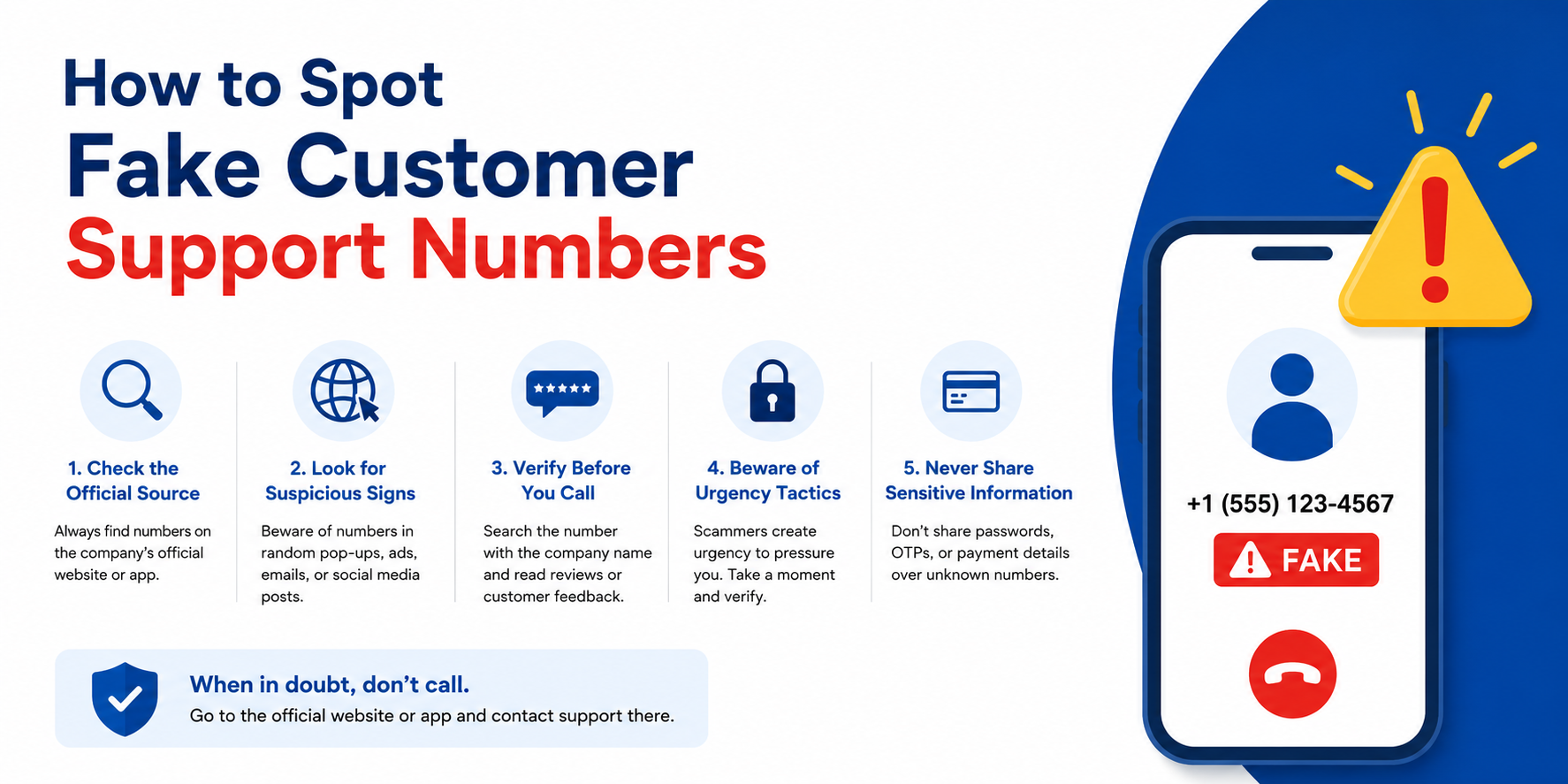
7. Fake Customer Support Numbers
Scammers sometimes buy ads or create fake listings so that searching for a company's customer support number leads to a fraudulent one instead. These fake representatives may ask for remote access to your device or payment for services that should be free. Always get support contact details directly from the company's official website rather than a general search engine result, and verify any phone number against the company's verified channels.
8. Requests to Install Software or Grant Remote Access
Legitimate businesses rarely, if ever, ask you to install unfamiliar software or grant remote access to your computer or phone out of the blue. This tactic is especially common in fake tech support scams, where a caller claims your device has a virus and needs immediate remote “repair.” Granting access can expose your files, passwords, and financial accounts, so this request should always be treated with suspicion.
9. Poor Grammar, Spelling, or Generic Messages
While scams have become more polished, many still contain awkward phrasing, spelling errors, or generic greetings like “Dear Customer” instead of your actual name. Legitimate companies typically personalize official communications and proofread them carefully. Sloppy formatting, inconsistent fonts, or mismatched logos in an email can also be a sign that something isn't quite right, even if the message otherwise looks convincing.
10. Unexpected Requests to Verify an Account
Unprompted emails asking you to “verify your account” or “confirm your identity” often link to fake login pages designed to steal your username and password. Before clicking, check whether you actually have a pending action with that company. If unsure, log in directly through the official app or website rather than through a link in the message. Legitimate account verification requests are typically triggered by an action you took, not a random email.
Legitimate Business vs. Potential Scam
Use this quick comparison to spot the difference between a trustworthy interaction and a likely scam:
|
Legitimate Business |
Potential Scam |
|
Uses official website |
Uses suspicious URLs |
|
Accepts standard payment methods |
Requests gift cards or crypto |
|
Provides verifiable contact details |
Hides contact information |
|
Explains charges clearly |
Uses pressure tactics |
What to Do If You Notice Scam Warning Signs
1. Stop communicating with the suspected scammer immediately.
2. Do not send money, gift cards, or personal information.
3. Verify the request independently using official contact details from the company's website.
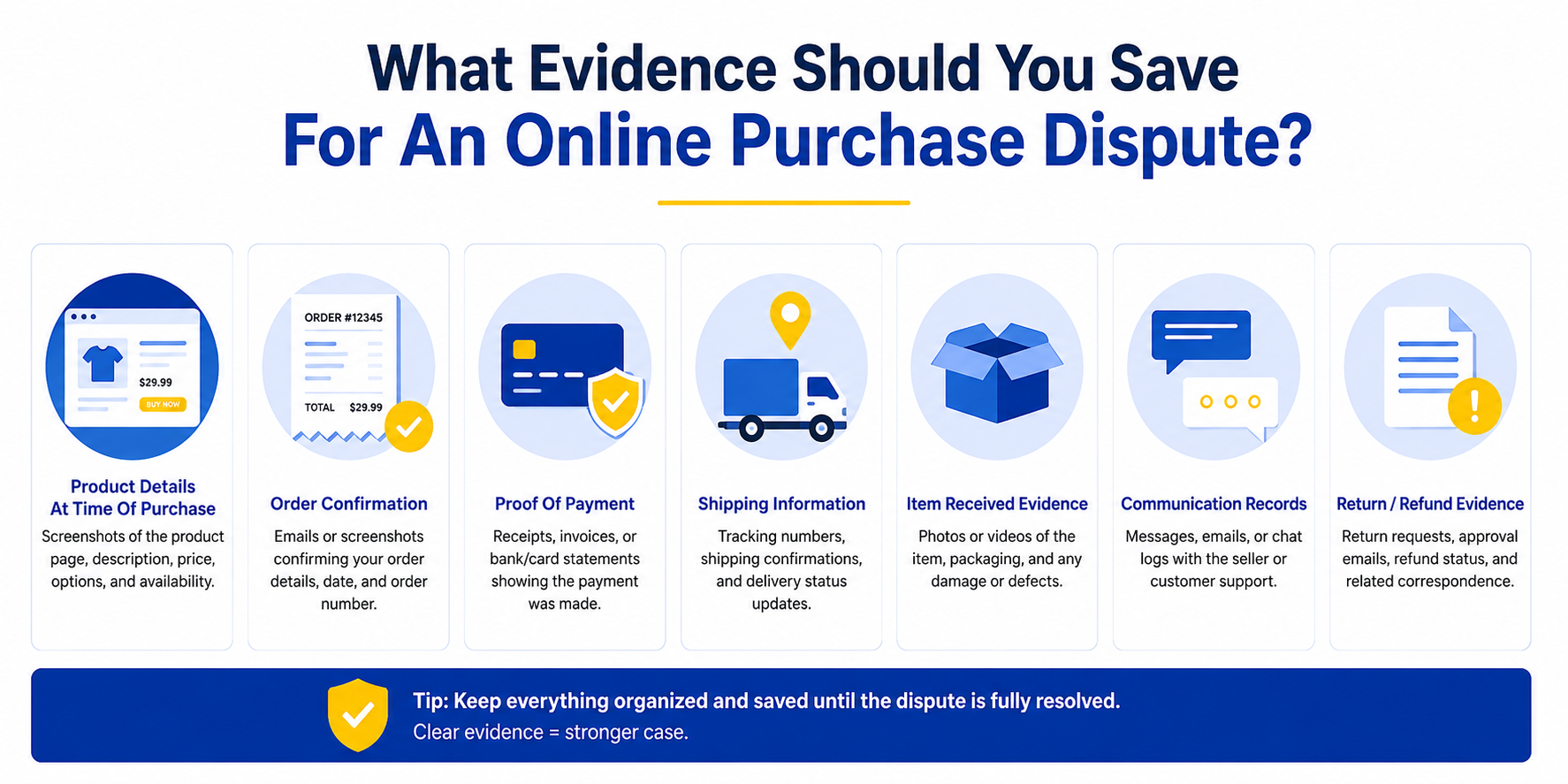
4. Save screenshots, emails, and call logs as documentation.
5. Report the scam to the appropriate authorities or platform.
6. Monitor your financial accounts closely if any information was shared.
What to Do If You Become a Victim of a Scam
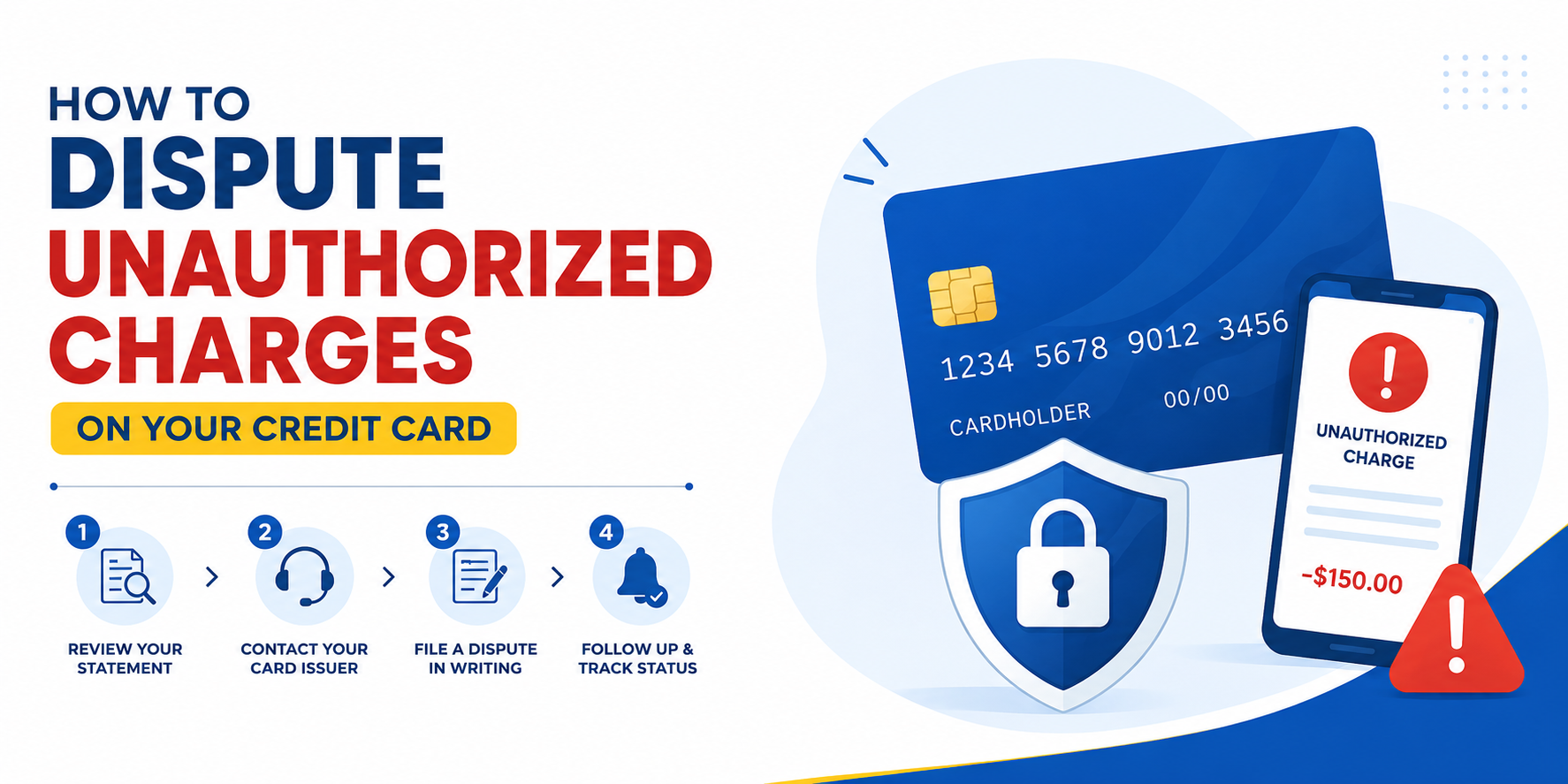
If you've already shared information or sent money, contact your bank or card issuer right away to report unauthorized charges and discuss reversal options. Change passwords on any affected accounts, especially if you reused that password elsewhere. If your Social Security number or other identifying details were exposed, consider placing a fraud alert or credit freeze with the major credit bureaus. File a report with the FTC at ReportFraud.ftc.gov, and keep records of every step you take. Monitoring your credit report over the following months can help catch any new accounts opened in your name before the damage grows.
Tips to Protect Yourself From Future Scams
- Enable multi-factor authentication on email, banking, and shopping accounts.
- Verify a website's legitimacy before entering payment information.
- Review financial statements regularly for unfamiliar charges.
- Treat unsolicited messages and calls with healthy skepticism.
- Research a business's reputation before making a payment or sharing information.
How RaiseAComplaint.com Can Help
RaiseAComplaint.com gives consumers a place to share scam experiences and warn others before they fall for the same tactics. If you've encountered a fraudulent business, fake online store, or deceptive customer support number, you can document what happened and raise a complaint so other shoppers can see the pattern. While RaiseAComplaint.com can't guarantee a refund or resolution, sharing detailed, honest experiences helps build a public record that supports smarter consumer decisions and pushes businesses toward more transparent practices.
The Bottom Line
Scams continue to evolve, but the underlying tactics rarely change. Recognizing scam warning signs — urgency, requests for sensitive information, unusual payment methods, and offers that feel too good to be true — remains the most reliable way to protect yourself before any damage is done. Rather than reacting in the moment, take time to verify requests independently, communicate only through official channels, and trust your instincts when something feels off. If you do encounter a scam, documenting and reporting it not only protects you but also helps warn other consumers. Staying alert and informed is, ultimately, the best long-term defense against fraud. How to Challenge Hidden Fees and Unexpected Charges
Frequently Asked Questions
What are the biggest scam warning signs?
The biggest scam warning signs include urgent pressure to act quickly, requests for sensitive information like passwords or Social Security numbers, payment demands through gift cards or cryptocurrency, and deals that seem unrealistically good. Combined, these tactics are designed to bypass careful thinking, so noticing even one is reason enough to slow down and verify.
How do I know if a website is fake?
Check the URL closely for misspellings, look for a secure checkout with “https” and a padlock icon, and search for verifiable contact information. Fake sites often have generic product photos, unrealistically low prices, and an unusual volume of identical five-star reviews. Searching the store's name with “reviews” or “scam” can also reveal other shoppers' experiences.
What should I do if I gave my information to a scammer?
Contact your bank or card issuer immediately to flag potential fraud, change any reused passwords, and consider placing a fraud alert or credit freeze with the credit bureaus. File a report with the FTC and monitor your accounts and credit report closely over the following months for unfamiliar activity.
Can I recover money lost to a scam?
Recovery depends on the payment method and how quickly you act. Credit card charges can sometimes be disputed, but wire transfers, gift cards, and cryptocurrency payments are rarely reversible. Reporting the scam quickly to your bank and the relevant authorities gives you the best chance, though recovery is never guaranteed.
How do I report a scam?
You can report scams to the FTC at ReportFraud.ftc.gov, your state attorney general's office, and the platform or company involved if relevant. If financial information was shared, also notify your bank or card issuer directly so they can monitor or freeze the affected account.
What payment methods do scammers commonly request?
Scammers typically ask for gift cards, wire transfers, cryptocurrency, or peer-to-peer payment apps because these methods are fast, difficult to trace, and nearly impossible to reverse. Legitimate businesses generally accept standard payment methods like credit cards or checks, so unusual payment requests are a strong warning sign.
How can I avoid phishing scams?
Avoid clicking links or downloading attachments from unexpected emails or texts, even if they appear to come from a known company. Instead, go directly to the official website or app to check your account. Look closely at sender addresses, since phishing attempts often use addresses that are slightly different from the real organization's.
What's the difference between phishing, smishing, and vishing?
Phishing refers to scam emails, smishing refers to scam text messages, and vishing refers to scam phone calls. All three rely on similar tactics — impersonating a trusted source and creating urgency — but differ in the channel scammers use to reach you.